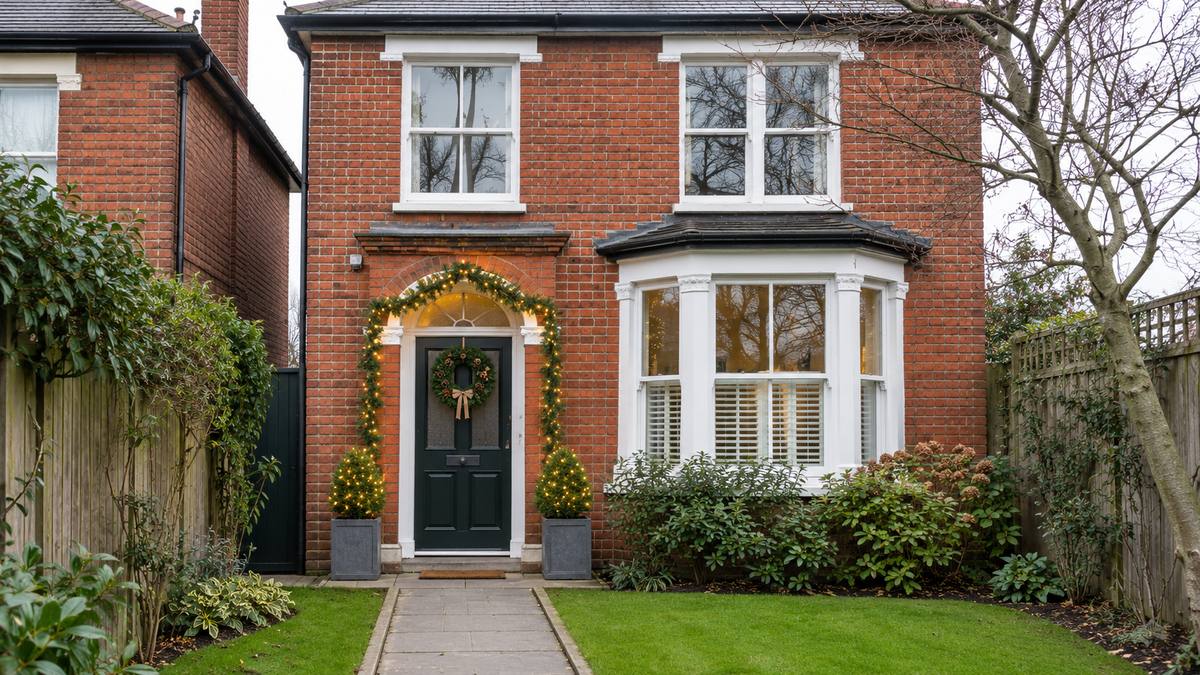
Send a clear daylight photo of the whole front of your home, an entrance view and any feature you want included in the display. Add your postcode and a short description of the result you want. That gives us a useful starting point for a Christmas lights quote without guessing from a cropped picture.
You do not need a polished property photograph. We need to understand the frontage as it is. The useful details are the ones that explain where the display should be seen, what belongs in it and what must stay accessible. A few purposeful views are more helpful than a long collection of nearly identical images.
Start with the whole frontage
Take the main picture in daylight, from a place where you can comfortably see the front of the property. Include the roof outline, windows, entrance and any front garden that forms part of your request. Do not crop out a feature simply because it is not decorative. It may explain the relationship between the doorway and the rest of the frontage.
A straight view makes it easier to understand the overall arrangement. If the street is narrow, send the clearest view available and explain what could not fit in the frame. There is no need to stand in traffic or enter somebody else's property for a wider photograph. A written note can explain what the picture cannot show.
Check clarity before pressing send
Open the image on your phone and look at it before sending it. If it is blurred, try another photograph with the phone held still. Avoid digital filters that change colours or make shadows disappear. Those effects can make an attractive social picture, but they remove information from an enquiry. An ordinary, sharp image is the useful choice here.
Bright sky behind a building can leave the subject looking dark. Tap the building on the screen so the camera exposes for the detail you want to show. If the result still hides important features, take another image from a comfortable position. Keep the original photograph rather than sending a screenshot of a screenshot; repeated captures can make small details harder to distinguish.
Give a separate view of the feature you want lit
If a tree, hedge or garden arch is part of the request, show it in relation to the house as well as on its own. A close picture of branches does not explain where the tree sits. The wider relationship matters when discussing whether the finished display should read as an entrance feature, a garden feature or part of the whole frontage.
For a window or balcony, show the surrounding facade so the proposed area is unambiguous. Explain which opening or level you mean in ordinary words. We do not need you to suggest a fitting method. Describe what you want the result to look like and leave the practical assessment for the quote discussion.
Caption the files so the request is unambiguous
A brief caption can save a lot of uncertainty. Write which photograph is current and which is a reference. If the files show different properties, label that clearly rather than leaving us to infer it. If a photograph comes from an earlier season, mention the date in your message and explain any changes since it was taken.
Keep personal details out of the picture where possible. Check for readable letters, vehicle registrations or people who did not expect to be photographed. You can choose another angle without hiding the part needed for the enquiry. There is no need to include an indoor room to explain an outside request. Share only the views relevant to the quote, alongside the postcode in the message.
Keep the quote conversation in one place
Send the pictures and your postcode on WhatsApp 07782 212334, followed by the short description. Keep later changes in the same conversation so it is clear which version of the request is current. If a picture is out of date because the frontage has changed, tell us what is different before relying on it for a quote.
You can check the public package descriptions on the London Christmas lights page. The installation cost guide is useful background when deciding what to ask about. A photograph and an agreed scope are still needed to make the discussion specific to your home.
If your message includes existing electrical products, show their labels only where they are already accessible. Do not open or alter equipment to make a photograph. Outdoor lights and sockets should be rated for outdoor use. If you are unsure about your outdoor electrics, ask a registered electrician.
For general product precautions, see Electrical Safety First: Christmas lights. Photographs help describe a request; they are not an electrical inspection. Send the frontage, postcode and your preferred look, and we can discuss what information is still needed.